Jabra PanaCast 50 video bar system




Microsoft Teams Rooms delivers a professional grade communication infrastructure designed to enhance collaboration across hybrid work environments. This certified technology transforms corporate meeting spaces into fully inclusive hubs, ensuring that every participant, regardless of location, can engage equally and effectively.
The platform’s strength lies in its intelligent capabilities. Advanced functionality, including AI driven video with IntelliFrame and accurate speaker recognition, ensures optimal presence for remote attendees. The innovative Front Row feature enhances equity by positioning distant colleagues at eye level, fostering a more connected experience.
For operational teams, managing Microsoft Teams Rooms is straightforward and efficient. The dedicated Teams Rooms Pro Management portal provides centralised control for proactive device monitoring, security administration, and remote maintenance. Deployment is significantly accelerated using Windows Autopilot, drastically reducing technical resource expenditure.
Microsoft Teams Rooms supports total spatial flexibility, accommodating everything from small touchdown areas to large boardrooms with certified hardware. Furthermore, the system is engineered for broad interoperability, incorporating Direct Guest Join functionality to consolidate communication and allow users to connect reliably with third party meeting solutions. This established platform provides global enterprises with a clear, trustworthy route to collaboration optimisation.
Microsoft Teams Rooms is engineered to establish an equitable and highly productive meeting environment for all participants. The following capabilities detail how this technology facilitates deeper connections, richer content co creation, and comprehensive audience inclusion. By focusing on robust feature integration, Microsoft Teams Rooms guarantees a superior, professional communication standard for enterprise use.
Microsoft Teams Rooms System Categories
The certified device ecosystem supporting Microsoft Teams Rooms provides professional, high quality meeting environments for businesses globally. These comprehensive systems ensure a consistent and reliable collaboration experience for all participants, whether they are physically present in the office or connecting remotely.
Signature

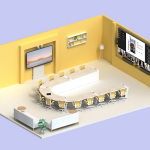
These robust Microsoft Teams Rooms configurations are specifically engineered for large scale spaces, accommodating eighteen or more individuals. They are the premier choice for formal presentations, significant corporate assemblies, and extensive work group collaboration sessions.
Traditional

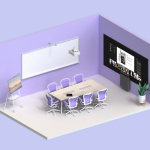
The Traditional Microsoft Teams Rooms systems offer a balanced solution for medium sized environments, supporting up to eleven in room participants alongside remote colleagues. This proven setup facilitates effective content sharing and collective connection for standard team meetings.
Entry Level

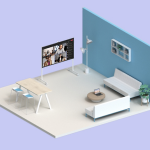
Optimised for smaller meeting areas, the Entry Level Microsoft Teams Rooms systems are perfectly suited for three to five individuals on site, with others joining virtually. These configurations enable efficient ideation and focused team collaboration in compact workspaces.
Not sure what
fits your setup?
Talk to an expert